Lidl Plus
LidlShopping
3.8793.00 Reviews
- Version
- 17.14.7
- Installs
- 100.00M
- Age Rating
- Everyone
Screenshots
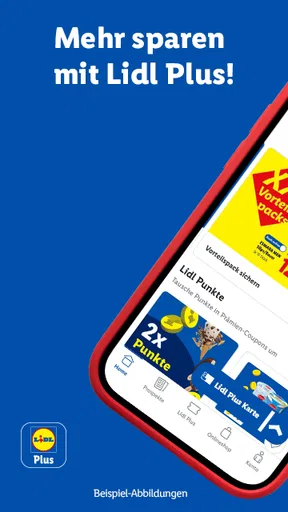
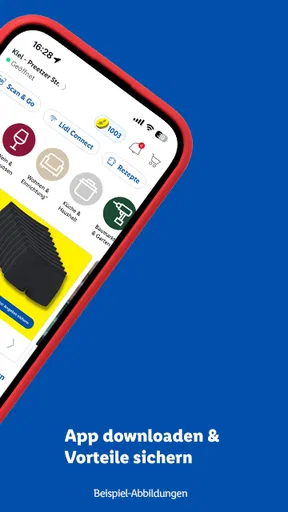
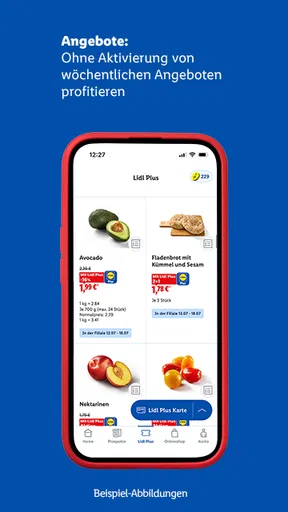
Our Review of Lidl Plus
 Analysis by Appyee
I found Lidl Plus most useful when I treated it as a digital checkout companion rather than as a general shopping app. Its central value is simple: it brings Lidl’s customer advantages and discounts into the phone, then makes them available during a real store visit. That sounds modest, but it changes the shopping routine in a practical way when I remember to check the app before paying.
This is a free shopping app from Lidl, aimed at everyone rather than at a narrow age group. It has become a very widely used service, with over 100 million installs and an average rating of 3.2 from around 2 million ratings. Those figures tell me two things at once: the app is clearly relevant to a large number of Lidl customers, but the experience is not universally smooth enough to earn an especially strong average opinion.
I would recommend trying it if Lidl is already one of your regular supermarkets. I would not install it simply because every shopping app sounds useful. The benefit depends on your shopping habits, your willingness to open the app before checkout, and how much value you place on store-specific discounts instead of comparing several retailers.
Why the digital discount system matters at checkout
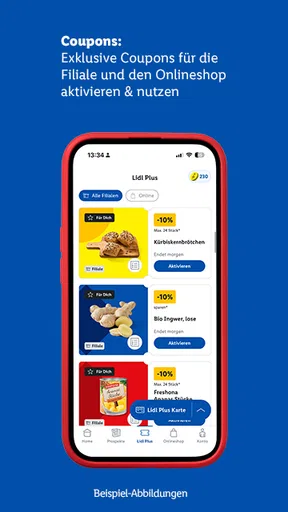
The capability I kept coming back to is the app’s discount and advantage system. Instead of relying on paper coupons or trying to remember a promotion while walking through the aisles, I can use the phone as the place where those offers are presented and managed. The important detail is timing: the app is most useful before the purchase, not after it.
That makes Lidl Plus different from a normal supermarket website. A website may help me browse general information, while this app is designed around the shopping relationship between a customer and Lidl. The phone becomes part of the checkout process. I open the app, review what is relevant, and use the available in-store benefit when I pay.
The real strength is not the number of screens; it is the connection between preparation and payment. If I check the app while making my shopping list, I can decide whether a discounted item is worth adding. If I wait until I am already standing at the register, the experience becomes more rushed and I am more likely to overlook something useful.
That workflow also explains why the app can feel excellent to one shopper and unnecessary to another. A person who visits Lidl often and buys a broad range of products has more chances to benefit. Someone who shops there only occasionally may find that opening another app, checking offers, and remembering to use it adds effort without changing the final basket very much.
Using it before leaving home
My preferred routine is to open Lidl Plus before I leave, rather than as I enter the store. I look through the current advantages, decide whether any match items I already need, and then keep the app available for checkout. This prevents the common mistake of buying something only because it appears discounted. A discount is useful when it supports the shopping plan, not when it creates an extra purchase.
I also find it helpful to separate “already planned” items from “possible bargains.” The first group belongs on the shopping list. The second group needs a quick reality check: would I buy it at the regular price, do I have a use for it, and will it replace something already in the basket? This small habit keeps the app from turning a focused grocery trip into impulse shopping.
For households, the practical question is who will use the app at the register. If one person prepares the list and another person does the shopping, the process works best when the shopper has access to the relevant account and knows what needs to be activated or shown. Otherwise, the benefit can be discovered too late. Lidl Plus is convenient, but it does not remove the need for a shared household routine.
What the checkout moment feels like
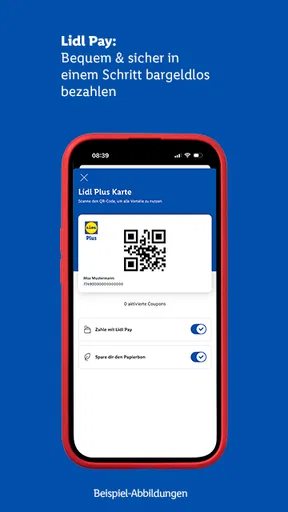
At checkout, the phone matters because the advantage has to be connected to the purchase. I would not describe this as a completely passive loyalty card that I can forget about. The safest approach is to open the app in advance, make sure the screen is ready, and avoid waiting until the last second when the queue is moving.
This is one of the app’s less obvious trade-offs. Digital convenience often shifts the work rather than eliminating it. Instead of carrying paper coupons, I need to keep my phone available and pay attention to the app. For me, that is a fair exchange, but it may not suit someone who prefers a traditional card or who does not want a phone involved in grocery shopping.
Another useful habit is to check the screen before leaving the store, especially after a larger purchase. I use that moment to confirm that the shopping process went as expected and to avoid assuming that every visible offer automatically applies. I would rather spend a few seconds reviewing the result than build my budget around a saving I never actually received.
A realistic weekly shopping example
Imagine I am planning a midweek shop for breakfast items, vegetables, cleaning supplies, and a few things for the weekend. Before leaving, I open Lidl Plus and compare the available discounts with my list. One offer matches something I already intended to buy, while another applies to a product I do not need. I keep the first one in mind and ignore the second.
At the store, I follow the list instead of wandering from promotion to promotion. When I reach checkout, I use the app as part of the payment routine. The saving is useful because it came from an existing need. If the app also encourages me to add several unrelated products, then its convenience has started working against my budget.
This example captures the best way to use the service: let the shopping list control the app, not the other way around. Lidl Plus can make a planned Lidl visit more economical, but it is not a substitute for comparing prices, checking quantities, or deciding whether a promotion is genuinely worthwhile.
Where it compares with ordinary alternatives
The usual alternative is to shop without a loyalty app and judge prices directly from shelf labels. That approach is faster and more private, and it avoids phone-related friction. It can also be better for someone who shops across several supermarkets and wants one broad comparison rather than a benefit tied to one retailer.
A paper coupon system is more visible and can be easier for shoppers who do not want to manage digital accounts. On the other hand, paper is easier to lose, and it does not fit as neatly into a phone-based shopping list. Lidl Plus offers a cleaner digital workflow, but that advantage depends on comfort with the app and on remembering to use it.
General grocery comparison tools may be better when my priority is finding the lowest price across different stores. Lidl Plus is more focused: it serves Lidl shoppers and makes that particular store’s advantages easier to use. I see it as a companion to price awareness, not as a complete replacement for comparing retailers.
The friction I would plan for
The average rating of 3.2 suggests that many users experience some frustration alongside the convenience. I would not treat that number as a reason to dismiss the app, but I would set realistic expectations. A loyalty app has several points where a small problem can matter: opening it at the wrong time, forgetting the phone, misunderstanding an offer, or discovering that a planned saving requires more attention than expected.
There is also a mental cost. Every extra shopping app competes for attention, and Lidl Plus makes the most sense when Lidl is a regular part of my routine. If I already have too many retailer apps, I would keep this one only if I can identify a clear benefit from using it. Otherwise, it becomes another notification source and another step before checkout.
People who prefer a completely straightforward shopping trip may dislike the need to prepare digitally. The app is not the right choice for someone who wants to walk into a store, pay, and never think about loyalty benefits. It is also less compelling for shoppers who rarely visit Lidl or who choose stores mainly by whichever one has the lowest total basket price that day.
Version, access, and everyday practicality
The current version is 17.8.6, and the app supports devices running Android 9 or later. That makes checking compatibility important before installing it on an older phone. On a modern device, I would still keep the operating system updated and make sure the phone has enough battery for the shopping trip, because a digital checkout tool is most inconvenient when the phone is unavailable.
The app is free to install, which lowers the barrier to trying it. “Free” does not mean it has no practical cost, though: I spend time reviewing offers, maintaining a shopping routine, and keeping the phone ready. I think that exchange is worthwhile when the app repeatedly supports purchases I was going to make anyway.
Its Everyone content rating also makes it suitable for a broad household audience. That does not automatically make it ideal for every family arrangement. If several people shop for the same household, agreeing on who checks the offers and who presents the app can be more important than the installation itself.
Who gets the most value
The strongest match is a regular Lidl customer who wants a simple way to keep store advantages close at hand. This person is likely to benefit from checking the app during list preparation, choosing only relevant offers, and using the phone deliberately at checkout. The value grows when shopping happens often enough for small savings and conveniences to accumulate in a meaningful routine.
It can also help a busy shopper who wants one place to prepare for a Lidl visit. I like the idea of checking the app while planning meals or household purchases, because it gives the discount system a clear role instead of making it a distraction in the aisle. The app works best when it supports decisions I have already started making.
I would be more cautious about recommending it to someone who shops at many different supermarkets and wants a neutral comparison. That shopper may gain more from a general price-checking approach. I would also hesitate for a person who dislikes digital loyalty schemes, has an older incompatible phone, or frequently forgets to use app-based benefits before paying.
My final view after using the workflow
Lidl Plus is a practical, free shopping app from Lidl, but its usefulness is highly dependent on behavior. It does not magically make every Lidl basket cheaper. What it does is make the retailer’s discounts and advantages easier to bring into a planned shopping trip, provided I check them early and remember to use the app at the right moment.
I appreciate that focused purpose more than a long list of loosely connected features. The best experience comes from a repeatable routine: open the app before leaving, match offers with the shopping list, ignore irrelevant bargains, and prepare the phone before checkout. That process turns the app from a promotional catalogue into a useful shopping aid.
My recommendation is therefore conditional but positive. If Lidl is one of your main supermarkets, install it and test whether the digital discount routine genuinely improves your regular basket. If you shop there rarely or prefer to compare every retailer without loyalty accounts, skipping it may be the more sensible choice. For the right shopper, it removes enough friction from Lidl’s benefits to earn a permanent place on the phone; for everyone else, it may simply be one more app to remember.
Privacy and Permissions
See what permissions an app requests and how it handles your data.
- Location
- approximate location (network-based), precise location (GPS and network-based)
- Phone
- read phone status and identity
- Photos/Media/Files
- read the contents of your USB storage, modify or delete the contents of your USB storage
- Storage
- read the contents of your USB storage, modify or delete the contents of your USB storage
- Camera
- take pictures and videos
- Wi-Fi connection information
- view Wi-Fi connections
- Device ID & call information
- read phone status and identity
- Other
- view network connections, connect and disconnect from Wi-Fi, expand/collapse status bar, full network access, run at startup, draw over other apps, control vibration, prevent device from sleeping
Verdict
Strengths of Lidl Plus
- Digital loyalty card is always available in the app.
- Personalized coupons can reduce the cost of regular shopping.
- Shopping lists help organize purchases before visiting the store.
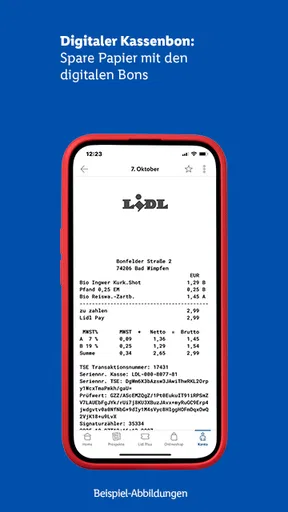
- Receipts are stored digitally for easier reference and returns.
- Store finder provides opening hours and nearby Lidl locations.
Limitations of Lidl Plus
- Some rewards and coupons require reaching specific spending thresholds.
- Offers may vary by country, region, or selected Lidl store.
- Coupons must often be activated before completing a purchase.
- The app may request location and notification permissions.
- A Lidl account and internet connection are needed for full functionality.
Similar Picks in This Category
View All
SHEIN-Shopping Online
Roadget Business PTE. LTD.4.8

Amazon Shopping
Amazon Mobile LLC4.4


Mercado Libre: Compras online
Mercado Libre4.8

Wish: Shop and Save
Wish US Holdings LLC4.7

Alibaba.com - B2B marketplace
Alibaba Mobile4.4
Frequently Asked Questions
What is Lidl Plus, and how does it work?
Lidl Plus is Lidl’s free digital loyalty app for Android and iPhone. After creating an account and selecting your preferred store, you can access digital coupons, weekly offers, purchase receipts, and other benefits available in your country. At checkout, you scan your personal Lidl Plus card in the app so eligible discounts can be applied to your purchase.
Is Lidl Plus free to download and use?
Yes, Lidl Plus is generally free to download and use, and there is no standard membership fee. You will need to register with an email address or mobile number and provide basic account information. Keep in mind that mobile data charges may apply, and some promotions, services, or features can vary depending on your country and local Lidl store.
How do Lidl Plus coupons and discounts work?
Coupons usually need to be activated in the Lidl Plus app before you shop. Once activated, scan your digital Lidl Plus card at the checkout and the qualifying discount should be applied automatically. Offers may have specific dates, product requirements, purchase limits, or participating-store restrictions, so it is important to read the coupon conditions before relying on a promotion.
Can I use Lidl Plus without an internet connection?
Lidl Plus works best with an active internet connection because offers, coupons, account details, and digital receipts may need to be synchronized with Lidl’s servers. In some cases, the app may still display a previously loaded digital card or information, but this cannot be guaranteed. To avoid problems at checkout, open the app and load your card before entering the store.
Does Lidl Plus protect my personal data and purchase history?
Lidl Plus requires personal information to create and manage your loyalty account, and the app may record purchase-related data when you use your digital card. Lidl states that this information is handled according to its privacy policy, but users should review the policy for their country before registering. Check the requested permissions and adjust notification or marketing preferences if available.
